How to use rayon’s MCP connector with chatgpt/claude
Connecting Rayon to ChatGPT and Claude: sharing a model into the chat, listing blocks and counting furniture, finding products and prices, exporting to a spreadsheet and restyling a drawing.
What you'll learn
Learn how to connect a Rayon model to ChatGPT or Claude with the MCP connector, then use the assistant to list blocks, count furniture, find products and restyle a drawing.
Connecting Rayon to ChatGPT or Claude
An MCP connector links a Rayon model to ChatGPT or Claude, which suits anyone who uses either as their main productivity tool. The video description has a link to create a free Rayon account and more information about the MCP connector.
Adding the Rayon plugin in ChatGPT
Open plugins on the left in ChatGPT, search for Rayon and click the plus button to connect the official Rayon plugin. Confirm the connection and sign in to your Rayon account to link the two, then click try to return to the prompt, where you can ask it to find data or make changes.
Sharing a model into the chat
To give ChatGPT the correct model, click share, make the link public, copy it and paste it into the chat. After about 15 seconds ChatGPT shows a preview with the model name and status, and you can flick through the different canvases.
Listing block instances and furniture
Ask for a list of every block instance in the model, which returns everything inside it. Then narrow it to the drawing canvas, remove non-furniture items, list them by type and give the quantity of each piece of furniture.
Finding products and prices
ChatGPT and Claude can search the internet for examples of those pieces with a price point and a URL, here returning UK purchase options for the chairs and other furniture. The information can then be pulled into a Google Sheet and formatted as an Excel file.
Restyling a drawing through ChatGPT
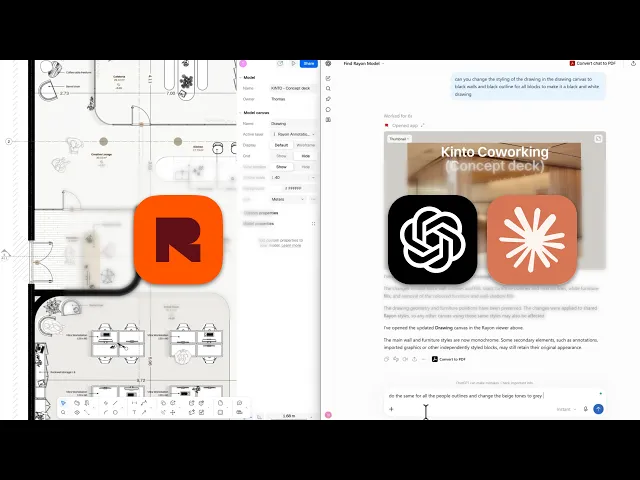
Ask ChatGPT to change the drawing style to black walls and black outlines on all blocks for a black and white drawing. It makes the changes as it goes, after you allow extra access to the Rayon model, and a re-prompt covers the people and sets base tones to grey.
Connecting Rayon to Claude
In Claude, click the plus button beside the prompt, go to connectors and add a custom connector, because there is not yet an official Claude connector. Name it Rayon, paste the connector URL from the video description, adjust the authentication settings if needed and click add.
Previewing the model in Claude
Hook up the specific model with the conversation in the same way, allow the restrictions that appear, and ask for a preview of the model. The same principles work as in ChatGPT, and the preview environment is very similar.
Related videos

How I built a mediterranean interior project portfolio (Rayon template)
From a Mediterranean template to a project portfolio.